Deploy AGW (Helm)
Install AGW Helm
Install Access Gateway on Ubuntu (Bare Metal)
Prerequisites
To setup a Magma Access Gateway, you will need a machine that satisfies the following requirements:
- 64bit-X86 machine with ubuntu 20.
- 2 ethernet ports.
- 8 Gb Ram.
- 4 Core CPU.
Deployment
1. Docker
Download the offical script to install and setup docker on ubuntu.
wget https://raw.githubusercontent.com/magma/magma/master/lte/gateway/deploy/agw_install_docker.shMake some changes in the script
sed -i "113 a\sed -i 's/debian/debian-test/' /opt/magma/lte/gateway/deploy/roles/magma_deploy/vars/all.yaml\n\
sed -i 's/focal-1.7.0/focal-ci/' /opt/magma/lte/gateway/deploy/roles/magma_deploy/vars/all.yaml\n\
       " "agw_install_docker.sh"
Execute the script
./agw_install_docker.shThis script will automatically setup docker and configure related things and restart machine.
2. Create a K8s Cluster
we'll only install the required components from this ansible-playbook.
Clone repo on your local machine(Not AGW machine).
git clone https://github.com/ShubhamTatvamasi/magma-galaxy.git && cd magma-galaxyMake changes to deploy-orc8r.yml file.
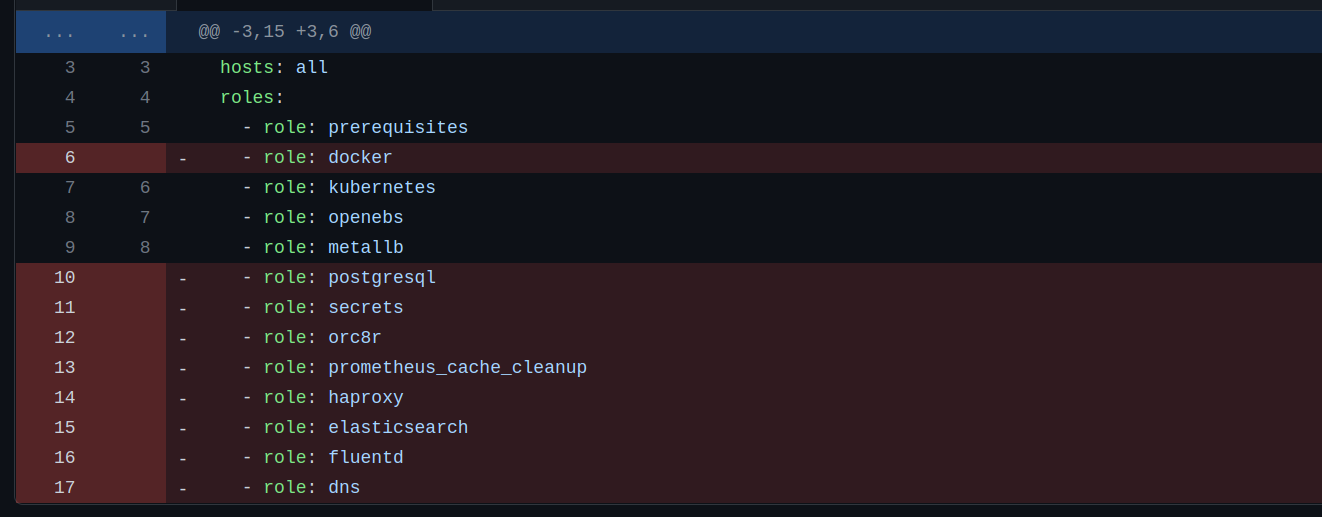
Make changes to hosts.yml file acc to your AGW host machine.
Copy ssh id to remote machine(Agw) to have passwordless ssh.
ssh-copy-id <Hostname>@<ip-address>Run playbook.
ansible-playbook config-orc8r.ymlThis playbook will take around 10 min to complete.
3. Deploy AGW
Files required
rootCA.pemcertificate file from orc8r.
place this file on the required location.
sudo mkdir -p /var/opt/magma/certs/
sudo cp rootCA.pem /var/opt/magma/certs/gwChallenge.keykey file.
To generate it.
cd /var/opt/magma/certs

# Generate Private key
sudo openssl ecparam -name secp384r1 -genkey -noout -out gw_challenge.key
sudo chmod 644 gw_challenge.key

# Generate Public key
openssl ec -in gw_challenge.key -pubout -out gw_challenge.pem
GW_CHALLENGE=$(cat gw_challenge.pem | sed '5d' | sed '1d' | tr -d '\n')
echo ${GW_CHALLENGE}snowflakefile that contains the uuid.
To generate this.
sudo uuidgen > /etc/snowflakeMake changes to hosts file
open /etc/hosts in edit mode and Add the following lines in the file
192.168.100.102 api.<Orc8rDomainName>.com
192.168.100.102 master.nms.<Orc8rDomainName>.com
192.168.100.102 magma-test.nms.<Orc8rDomainName>.com
192.168.100.102 fluentd.<Orc8rDomainName>.com
192.168.100.102 controller.<Orc8rDomainName>.com
192.168.100.102 bootstrapper-controller.<Orc8rDomainName>.com
replace 192.168.100.102 with your orc8r address.
Verify the sanity of rootCA.pem file
openssl x509 -text -noout -in /var/opt/magma/certs/rootCA.pemCreate /var/opt/magma/configs/control_proxy.yml with your orc8r/controller details
sudo mkdir -p /var/opt/magma/configs/
sudo vim /var/opt/magma/configs/control_proxy.yml
Insert the following lines.
cloud_address: controller.<Orc8rDomainName>.com
cloud_port: 443
bootstrap_address: bootstrapper-controller.<Orc8rDomainName>.com
bootstrap_port: 443
fluentd_address: fluentd.<Orc8rDomainName>.com
fluentd_port: 443
rootca_cert: /var/opt/magma/certs/rootCA.pem
Verify connectivity between AGW and Orc8r
telnet bootstrapper-controller.<Orc8rDomainName>.com 443Will return this:
Trying 192.168.100.102...
Connected to bootstrapper-controller.<Orc8rDomainName>.com.
Escape character is '^]'.
Connection closed by foreign host.
Pull Docker images.
docker pull public.ecr.aws/z2g3r6f7/agw_gateway_python:latestand
docker pull public.ecr.aws/z2g3r6f7/agw_gateway_c:latestClone Magma repo and go to docker directory
git clone https://github.com/magma/magma.git && cd magma/lte/gateway/docker/Start docker containers
docker-compose upLet's check the docker containers
docker ps | grep agwf223ec6b263a agw_gateway_c:latest "sh -c 'mkdir -p /va…" 2 hours ago Up 2 hours (healthy) sessiond
2a697165cb5d agw_gateway_c:latest "sh -c '/usr/local/b…" 2 hours ago Up 2 hours (healthy) oai_mme
4039f37c83ea agw_gateway_python:latest "/usr/bin/env python…" 2 hours ago Up 2 hours (healthy) state
ef013657f24d agw_gateway_python:latest "/usr/bin/env python…" 2 hours ago Up 2 hours (healthy) directoryd
b857dad4a497 agw_gateway_python:latest "/usr/bin/env python…" 2 hours ago Up 2 hours (healthy) policydb
699b02b77096 agw_gateway_python:latest "bash -c '/usr/bin/o…" 2 hours ago Up 2 hours (healthy) pipelined
a9fe8e372aa5 agw_gateway_python:latest "/bin/bash -c '\n /u…" 2 hours ago Up 2 hours magmad
8c71efadcd82 agw_gateway_c:latest "/usr/local/bin/conn…" 2 hours ago Up 2 hours (healthy) connectiond
8fc2bc86d804 agw_gateway_python:latest "sh -c 'sleep 5 && /…" 2 hours ago Up 2 hours (healthy) mobilityd
2802a768aee6 agw_gateway_python:latest "/usr/bin/env python…" 2 hours ago Up 2 hours (healthy) smsd
1125fafb1ef3 agw_gateway_python:latest "/bin/bash -c '/usr/…" 2 hours ago Up 2 hours (healthy) td-agent-bit
c00658880aa8 agw_gateway_python:latest "/bin/bash -c '/usr/…" 2 hours ago Up 2 hours (healthy) redis
a87e091bd742 agw_gateway_python:latest "/usr/bin/env python…" 2 hours ago Up 2 hours (healthy) monitord
198350944c07 agw_gateway_python:latest "/usr/bin/env python…" 2 hours ago Up 2 hours (healthy) subscriberdb
f33689b8ca7c agw_gateway_python:latest "/usr/bin/env python…" 2 hours ago Up 2 hours (healthy) eventd
3768d2542379 agw_gateway_python:latest "/usr/bin/env python…" 2 hours ago Up 2 hours (healthy) redirectd
e095aa4b41b1 agw_gateway_python:latest "/usr/bin/env python…" 2 hours ago Up 2 hours (healthy) health
7f450f751545 agw_gateway_python:latest "/usr/bin/env python…" 2 hours ago Up 2 hours (healthy) enodebd
ded1bfd70252 agw_gateway_python:latest "/usr/bin/env python…" 2 hours ago Up 2 hours (healthy) ctraced
035dbd0d3ac9 agw_gateway_python:latest "sh -c '/usr/local/b…" 2 hours ago Up 2 hours (healthy) control_proxy
0ec3a61a34d0 agw_gateway_c:latest "/usr/local/bin/sctpd" 2 hours ago Up 2 hours sctpdEvery container is in healthy condition. Now, let's delete them
docker-compose downGo to helm directory
cd ../deploy/agwc-helm-charts/Edit values.yaml file
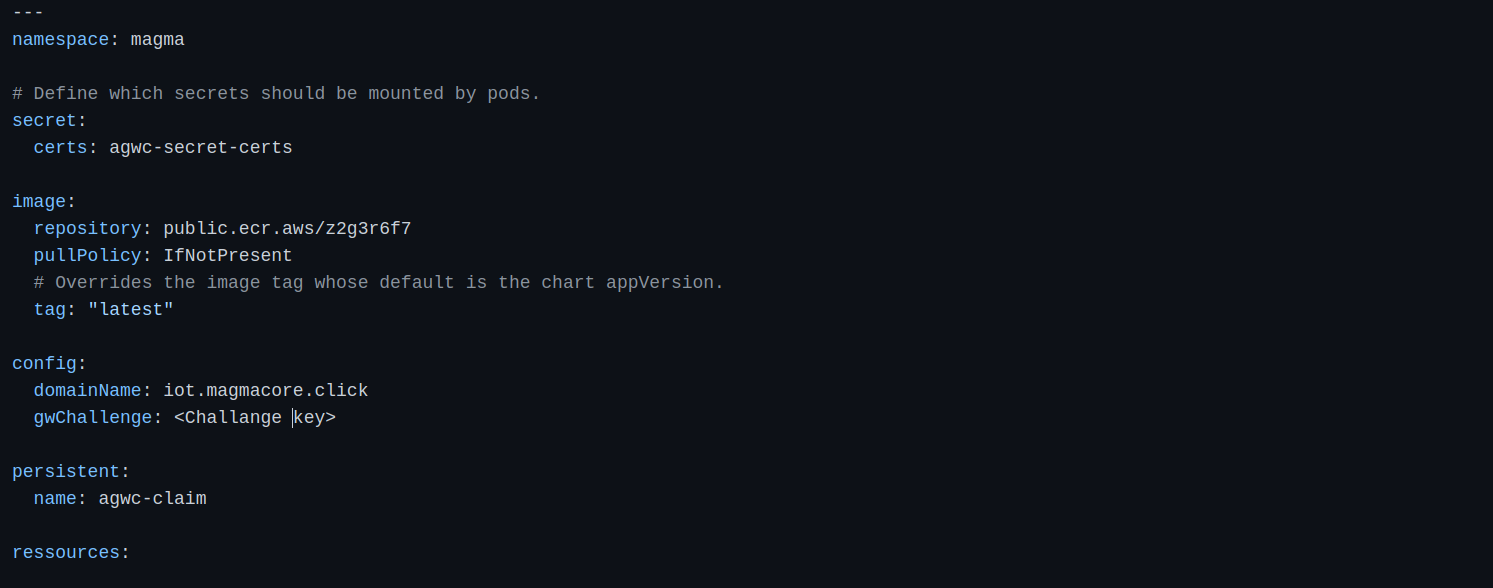
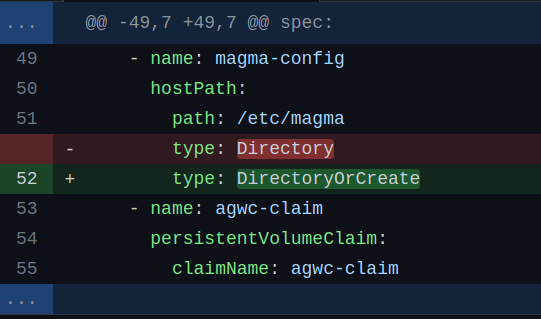
Edit agwc-config.pod.yaml file.
nano templates/agwc-config.pod.yamland change hostPath type from Directory to DirectoryOrCreate
Create magma namespace
kubectl create namespace magmaCreate rootca certificate secret needed to communicate with orc8r
kubectl create secret generic agwc-secret-certs --from-file=rootCA.pem=rootCA.pem --namespace magmamake sure to execute this command on the directory where rootCA.pem file is present.
Deploy an AGW after updating values.yaml
cd lte/gateway/deploy/agwc-helm-charts
helm --debug install agwc --namespace magma . --values=values.yaml
Make sure all pods are in running state.
kubectl get pods -n magma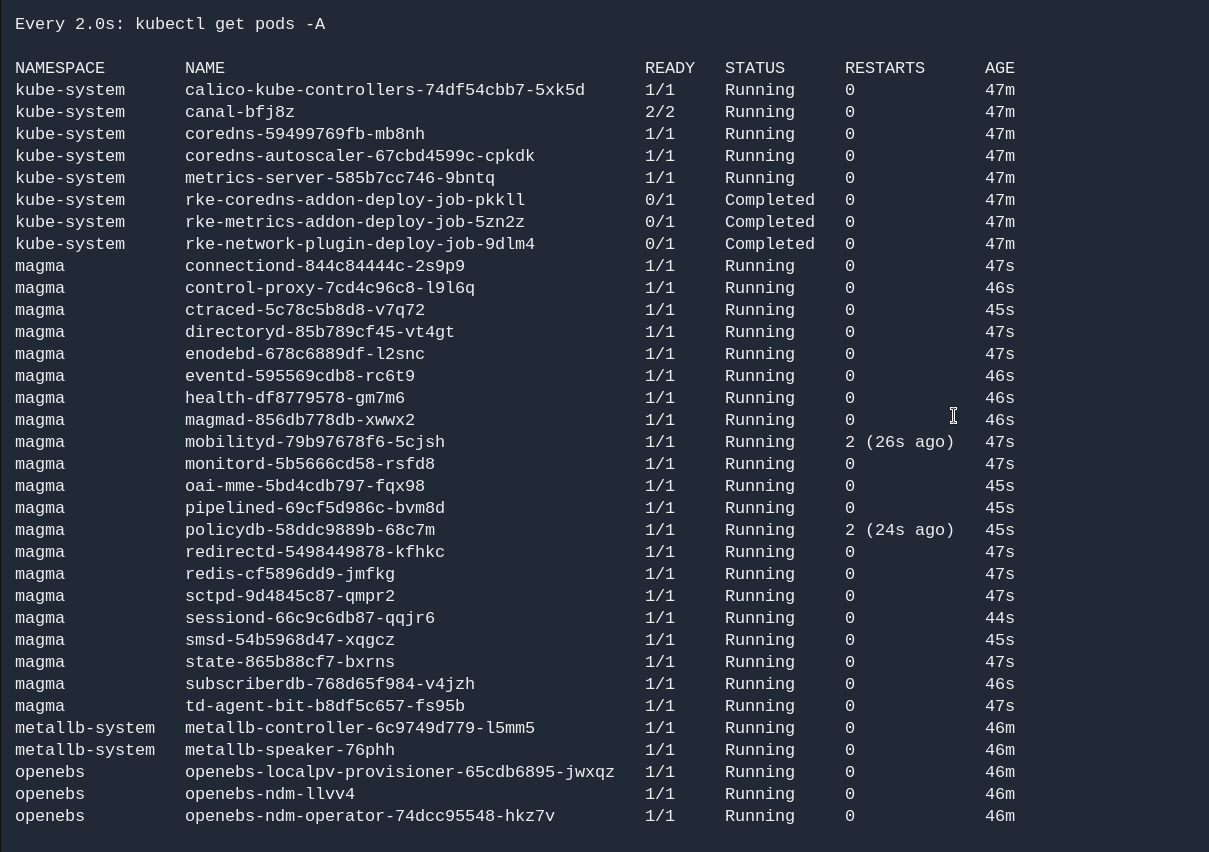
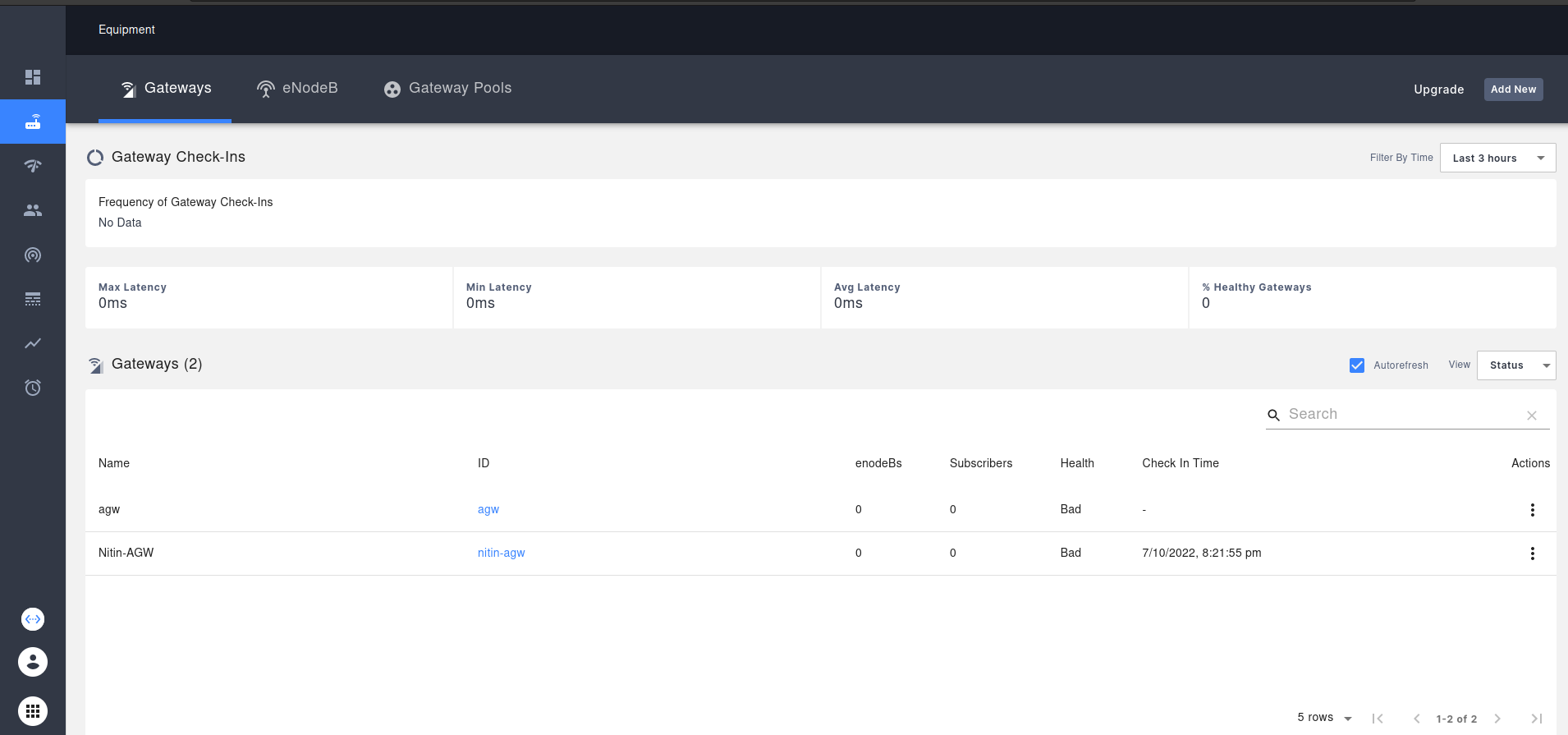
Now lets connect the orc8r with AGW. Open your orc8r dashboard and go to Equipment section.
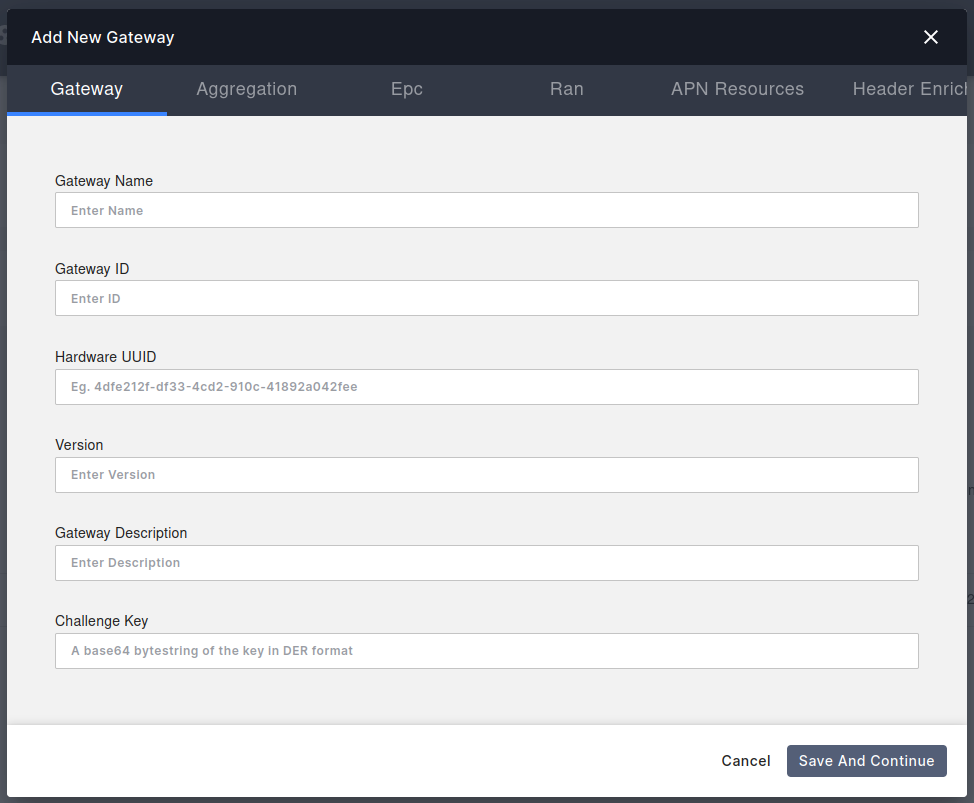
Add a new AGW By entering the following details.
AGW added successfully.
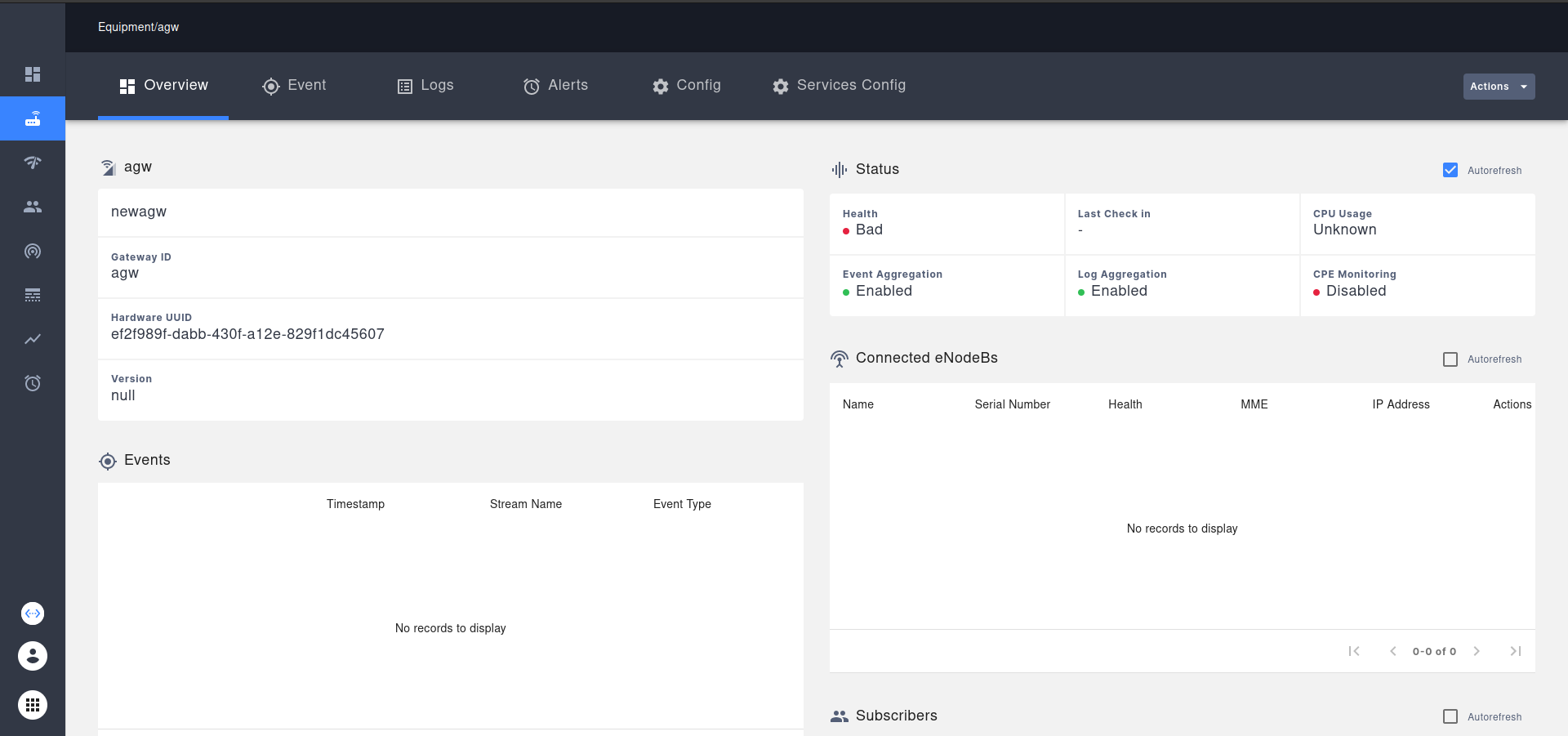
Health will come to healthy state when the connection will be successful and agw service will synchronize themself.